Personal project: Unreal custom Niagara spline interface
Unreal custom Niagara spline interface:
- The concept:
Whoa boy the title is a bit of a word salad, but let me explain what I wanted more simply. Basically, I wanted to have a particle system follow a set track (in Unreal), speeding up and slowing down as it followed it. Luckily, splines exist. A spline is basically a list of ordered points in the world (with a bit of extra stuff defining scales, tangents and how they should be interpolated between) that produce a trail. And handily, Niagara (Unreal's particle system) has an (admittedly experimental) data interface for splines. This allows you to pass a spline into the particle system and use functions in the interface to create the particle system you want. I even found a tutorial on how to create the type of effect I wanted. So job done, right?
Wrong. Very close, but no cheddar. The Niagara interface has functions allowing you to get the position along the spline by passing in how far along the spline you are. But this is based on distance only. Remember how I said I wanted to have the system speed up and slow down based on the spline? The unreal spline component has a duration value, and has a function to get the position for a passed in time, which is perfect because it'll slow down as points are closer together and speed up as they're further apart. However... the data interface does not. So I can't use that function within the Niagara system, and using the ones there would make the effect travel at a constant speed. Which means... I'm going to need to write my own interface.
Oh, right, why am I doing this in the first place? Well, it's part of a larger project which I'm going to keep quiet on for now (I don't want to spoil the ideas until I can show them working properly). But that's the other reason I didn't mind going through all the work of creating an entire new data interface; it allows me the flexibility to add additional stuff into the interface that I can use later in the particle effect, or in other Niagara effects using splines.
- The challenge:
Unfortunately, creating a Niagara data interface isn't particularly easy. However I had two good sources to work off; the Unreal example data interface, and the existing spline data interface. What I was doing with splines was a bit more complicated than the example, however where it was useful was allowing me to understand what functions were doing, which I was struggling with a bit looking at the existing spline one without context (you'll understand why when we get to some of the code).
So to explain a little bit about a Niagara data interface:
- The instance data struct
Actual calculations for functions in the interface need to either run on render threads in the CPU, or on the GPU. Due to the complexities of what I needed and might need in the future, I decided to limit scope of the interface to the render threads for now, although I might extend it to the GPU if needed because of performance. However, that still means that data needs to be passed between the spline object the calculations are using and the render thread. The data instance allows for this, although passing data to the graphics processing means we need to carefully consider multithreading. All data that is used in the niagara functions should be stored in the interface itself - no transient data like object pointers! Which is a little unfortunate as we're trying to read the data in a spline object. However the spline is just a connection of interpolated curves, plus a couple of extra bits (transform and duration in this case) - stick those in the data interface and hey presto. We also define our processing logic for getting the position here; potentially this could be done outside of the struct, but using the instance is heavily polymorphic, so having it all together is much prefered.
2. Initialising the data
So now we've got our struct, we need to fill the data in. This isn't too tricky; there's a functition in the class for the per instance tick; all we need to do there is grab the spline (in this case from the object the niagara system is attached to) and then copy the data from the spline to the data instance, pretty straightforward really.
3. Defining our function
So now we've got our instance and the data, nice, but how are we actually going to call a function in niagara? Luckily, this isn't too bad either; there's a function on the niagara data interface to define all the functions we could want:
void UNiagaraSplineInterface::GetFunctionsInternal(TArray<FNiagaraFunctionSignature>& OutFunctions) const
{
    FNiagaraFunctionSignature Sig;
    Sig.Name = GetSplinePosAtTimeName;
    Sig.Description = LOCTEXT("GetSplinePositionNameFunctionDescription",
       "Gets the spline position at a given time");
    Sig.bMemberFunction = true;
    Sig.bRequiresContext = false;
    Sig.AddInput(FNiagaraVariable(FNiagaraTypeDefinition(GetClass()), TEXT("Spline interface")));
    Sig.AddInput(FNiagaraVariable(FNiagaraTypeDefinition::GetFloatDef(), TEXT("InTime")));
    Sig.AddOutput(FNiagaraVariable(FNiagaraTypeDefinition::GetPositionDef(), TEXT("OutPos")));
    OutFunctions.Add(Sig);
}
Okay, so we're done right? That wasn't too bad at all, I don't know what-
4. Binding the inputs and outputs of our function
DEFINE_NDI_FUNC_BINDER(UNiagaraSplineInterface, GetSplinePositionVM);

// this provides the cpu vm with the correct function to call
void UNiagaraSplineInterface::GetVMExternalFunction(
    const FVMExternalFunctionBindingInfo& BindingInfo,
    void* InstanceData, FVMExternalFunction& OutFunc)
{
    if (BindingInfo.Name == GetSplinePosAtTimeName)
    {
       TNDIExplicitBinder<
          FNDITransformHandler, TNDIParamBinder<
             1, float, NDI_FUNC_BINDER(
                UNiagaraSplineInterface, GetSplinePositionVM)>>::Bind(
             this, BindingInfo, InstanceData, OutFunc);
    }
    else
    {
       UE_LOG(LogTemp, Display, TEXT("Could not find data interface external function in %s."
                         " Received Name: %s"),
          *GetPathNameSafe(this), *BindingInfo.Name.ToString());
    }
}
Oh. Oh no.
That's not friendly code. Belive it or not, it was even less friendly in the niagara class I was adapting, because it was also templated with an extra bool for if the spline was using look up tables or not, which I didn't want. But let's go through it bit by bit and try to break it down.
First, we're defining a binder using the DEFINE_NDI_FUNC_BINDER macro. This takes the function we want and makes a struct with a bind function on it; you can see that being used in GetVMExternalFunction. However, we can't just use that binding function directly, because we need to specify our inputs to the function. This is done by the TNDIParamBinder struct, which specifies the register type for our inputs (float, for the lifetime our our particles). We could end it here, but we want the particles to be in the correct place; that's what the TNDIExplicitBinder allows us to do, because it adds a known type (the transform handler) to the parameters.
This leads us to the function we actually want to call:
// implementation called by the vectorVM
template<typename TransformHandlerType, typename InputType>
void UNiagaraSplineInterface::GetSplinePositionVM(FVectorVMExternalFunctionContext& Context)
{
    VectorVM::FUserPtrHandler<FNDISplinePositionInstanceData> InstData(Context);
    InputType InTimes(Context);
    TransformHandlerType TransformHandler;
    VectorVM::FExternalFuncRegisterHandler<float> OutPosX(Context);
    VectorVM::FExternalFuncRegisterHandler<float> OutPosY(Context);
    VectorVM::FExternalFuncRegisterHandler<float> OutPosZ(Context);

    for(int i = 0; i < Context.GetNumInstances(); i++)
    {
       const float instanceTime = InTimes.Get();
       FVector outPos;
       InstData->GetPosAtTime(instanceTime, outPos);

       TransformHandler.TransformPosition(outPos, InstData->Transform);

       *OutPosX.GetDest() = outPos.X;
       *OutPosY.GetDest() = outPos.Y;
       *OutPosZ.GetDest() = outPos.Z;
       InTimes.Advance();
       OutPosX.Advance();
       OutPosY.Advance();
       OutPosZ.Advance();
    }
}
You can see our template parameters from the binding at the top; first the transform handler, and second the register of floats, being defined as floats by InputType. You can also see our pointer to the data struct we made. Then all we do is call our function on that struct (GetPosAtTime) for each of the input values in the register, transform the position using the transform handler, output it and hey presto we're done! (For real this time)
- The result
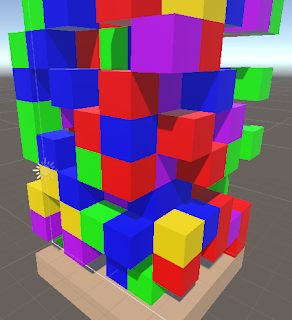
What we get out (after a bit of time in niagara to create the particle system) you can see below:
The effect follows the spline, slowing as the spline points are close, and speeding up as the spline points are further away, just what I wanted. You can see the full code for the interface on my github.
This was the first step towards the larger project (and fingers crossed the hardest step) so I'm looking forward to sharing more of where this spline goes with you in the future!

Comments
Post a Comment